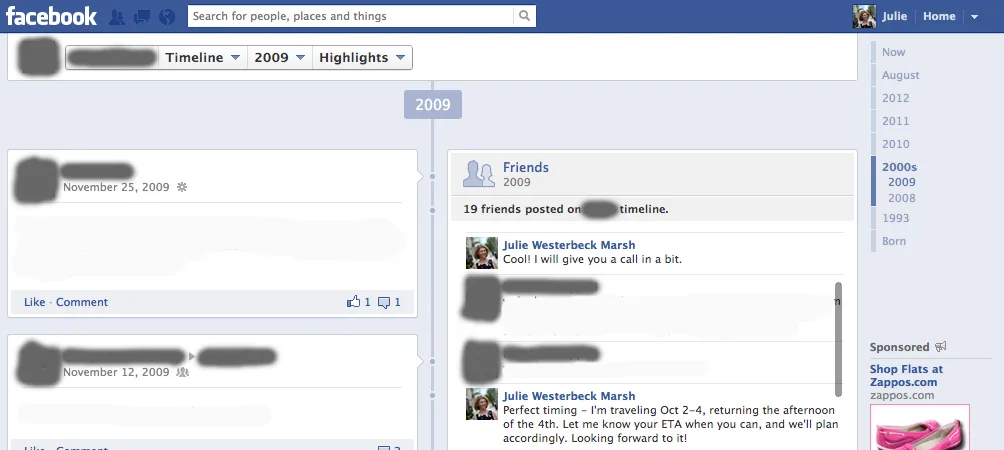
We know that there have been reports by Snopes and TechCrunch over the last few days that the Facebook bug posting your old private messages on your wall is a hoax, but just this morning we found a few of our own very personal messages from 2010 and earlier posted for everyone to see. {updated with greater detail}
2. Click 2010 (and then earlier) from the right side
3. Look at “Friends 2010: # friends posted on Your Name’s timeline”
4. Hover or click the pencil (depending on your computer)
5. Select Hide From Timeline
(Repeat for previous years)
Keep in mind, we’re not seeing every single private message we sent, but there were definitely a few mixed in with the public wall posts. And while it might be tough for people to find them, we’re pretty sure you wouldn’t want your private messages made public at all. That’s why they’re called “private messages,” right? Here’s hoping they fix this bug fast. –Kristen & Liz
EDITED TO ADD: We also recommend that you grab a screenshot of any errant private messages, for documentation. Good luck.
Another editor’s note: Your private messages may show up in your friend’s timeline and your friends’ DMs may show up in your timeline. And you will need to ask them to delete them.
To check to see if your conversation is indeed public, go to their page and click the settings icon. Then hit “See Friendship” and it will show you all your public interactions, which we’re now noticing may have been previously private.
{Thanks for the heads up, Kara!}
–EDITED 9/29–
If you can add any value or offer other information in a civil, calm, fact-based way you are welcome to comment. Disparaging remarks of any stripe will be deleted immediately. Welcome to our community. It’s always been a respectful one and we’d like to keep it that way.


Leave a Reply