You know the junk mail or spam box in your email, where sometimes non-spam emails end up? Well, it turns out Facebook has a similar filter for your Facebook Messenger PMs, and just like with email, a lot of legit messages are getting sucked into this filter and we’re not seeing them.
Until now.
A friend pointed out how to find those filtered messages, which only takes a few clicks and while it might not uncover some million dollar inheritance from a long-lost uncle, it might still have something you’d rather not miss.
In fact I accessed my own hidden Facebook messages today and felt terrible to discover dozens of unanswered messages — some a couple years old! — from work associates and friends who I hadn’t yet “friended” on Facebook.
Curious to see what you might be missing? Here’s the quick way you can find your own filtered messages too.
How to find hidden messages in the Facebook Messenger app, step-by step
1. In the Facebook app, click on Settings, represented by the gear icon at the top or bottom right corner of your device.
2. When you’re there, click on the People tab. It’s that grey icon with two people on it.
3. Next, click on Message Requests.
At the bottom, you’ll see text that says See filtered requests — it’s in blue on my phone. Click there.
4. Whoa. Tons of messages.
Everything you haven’t responded to will be in bold font, and my unanswered messages went all the way back to 2014. Yikes, sorry, friends!
Sure, one or two messages of mine were spam, but almost all the rest were legitimate work-related conversations. It makes sense, because these were from people I wasn’t already connected to on Facebook, but I still would like to have seen them.
How to find Facebook hidden messages using Facebook in a browser
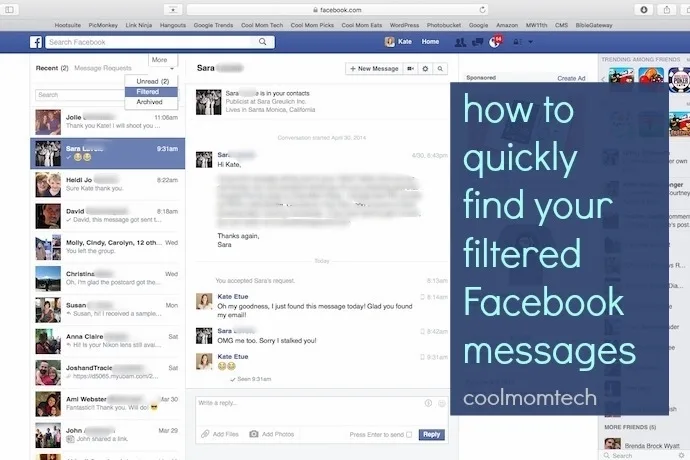
1. If you’re using Facebook in a browser, click on your Messages icon at top (the two talk bubbles), then at the bottom of the drop-down menu of messages, click See All.
2. At the top of this feed, you’ll see an icon that says More. Click that, and you’ll see options for Unread, Filtered, and Archived Messages. click on Filtered in the drop down menu that pops up. Easy.
Note that once you accept a message from someone in your Filtered Messages folder, you’ll now see that person in your Recent Messages folder. But keep checking back here regularly, because anyone you haven’t approved communication with could end up here.
Now, time to work on that apology for the two-year-old messages I still haven’t replied to.


Leave a Reply