How to set a Live photo as your iPhone's wallpaper
I tend to be the one who schools my husband on cool iPhone tips and tricks , but this time, he's the one who schooled me when he showed me how to set a live photo as my iPhone's wallpaper. I admit, I take a bunch of live photos, but don'…
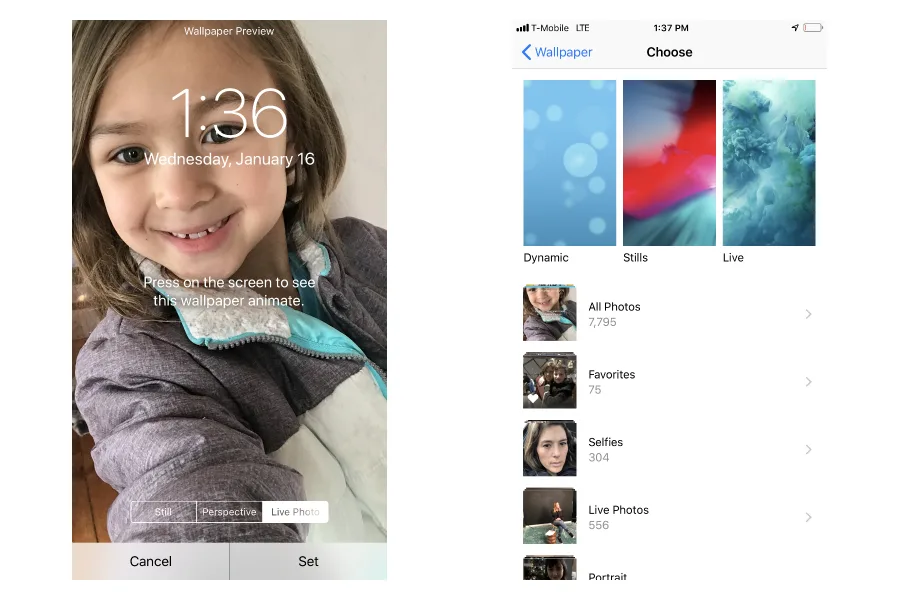
I tend to be the one who schools my husband on cool iPhone tips and tricks, but this time, he's the one who schooled me when he showed me how to set a live photo as my iPhone's wallpaper. I admit, I take a bunch of live photos, but don't ever watch them animate, so I'm glad I found a way to dig them out of my gallery where I can see and watch them.
How to set a Live photo as your iPhone's wallpaper
1. Go to Settings > Wallpaper > Choose new Wallpaper.
2. Scroll down to find your Live Photos album.
3. Choose the Live photo you want and click set.
That's it. Now when you press down on the middle of your iPhone screen, you'll see your photo animate. Fun!
For busy parents, our smartphones have become our lifelines, whether it's the calendar that helps keep families on track to the emails, social media, and various apps that keep us connected personally and professionally. That's why it's …
If you want to know how to check your voter registration, we're glad you asked! Because you might have heard there's a pretty big election coming up, not just for President, but for 33 US Senate seats, all 435 seats in the House of Repre…
In April 2024, the total solar eclipse will hit our sky, and let's just say we're all pretty excited. If you've got the date marked on your calendar (or wondering if you should), check out these tips for watching the solar eclipse from o…
 Tips and Tricks
 Causes and Giving Back
 Tips and Tricks