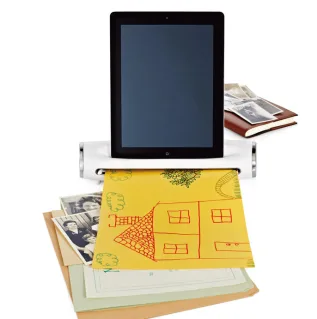
How do you scan images to your iPad? iConvert

Just when I thought my iPad couldn’t get more useful, I discovered this handy new gadget that lets you scan photos, receipts, even your kids’ artwork right to your iPad. Genius! The handy, compact iConvert Scanner allows you to save photos and documents as JPEGS on your iPad or iPad…

BY

·

Just when I thought my iPad couldn’t get more useful, I discovered this handy new gadget that lets you scan photos, receipts, even your kids’ artwork right to your iPad. Genius!

The handy, compact iConvert Scanner
allows you to save photos and documents as JPEGS on your iPad or iPad
2. Simply download the free app, attach your iPad to the scanner, and
then load up your pics, art, and docs to your heart’s content.

I’ve seen
the scanned result of a slew of old photos and I was super impressed
with the quality and detail. And even better, you won’t lose desk space
with the iConvert; it’s small enough that you could carry it around with
you.

The gadget doesn’t come cheap, but if you’re a consummate tablet user
and you want to get your files to the cloud as quickly and easily as
possible, this is a terrific way to go. -Kristen

You can purchase the iConvert Scanner at Brookstone.

{h/t Ciaran Blumenfeld}


2 responses to “How do you scan images to your iPad? iConvert”

  1. Love this! I have so many scrapbook pages, receipts, etc I want to make digital but taking a pic with the iPad is not ideal.

  2. How do I label each scanned photo with my ipad?

Leave a Reply

Your email address will not be published. Required fields are marked *

Shop Related Gift Guides

Expertly tested, editor-approved picks.

View All (opens in new tab)
Wooden toys flatlay

Heirloom Wooden Toys

Shop Guide (opens in new tab)
Skincare products flatlay

The Self-Care Edit

Shop Guide (opens in new tab)
Mom and child reading

The New Mama Edit

Shop Guide (opens in new tab)

Sophistication in your inbox.

Weekly curated gift finds

Mom-tested favorites

Holiday exclusives

No spam. Ever.