My whole pre-kids life is documented on 35mm film prints and backed up on photo negatives, which is pretty hard to believe now that we’re so firmly ensconced in an era of digital smartphone pictures. I get motivated to transfer all those pictures to digital format, but then reality sets in and I realize–who am I kidding?
Instead of paying fortune to have a pro convert those old film negatives to digital, here’s a quicker and easier way to transfer the best shots from my youth using this cool new gadget.
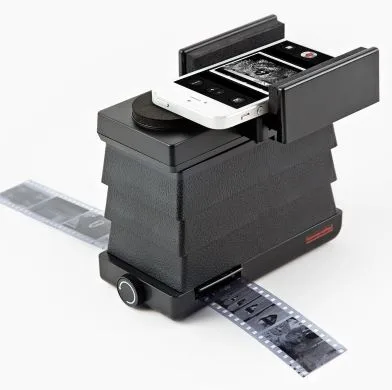
The Lomography Smartphone Scanner is a cool piece of photography equipment that lets you scan those negatives onto your smartphone in a couple of easy steps. There is a slot that you simply roll the negatives into (it takes 35mm slides too) and then you just snap your smartphone into the top.
The holder is adjustable so it fits both Android phones and iPhones. Hooray!
The scanner comes with a backlight that allows you to see your image, and then, using the free iPhone and Android Lomoscanner app to instantly convert that negative image to a positive, you can snap it using the phone’s camera and voila. It’s instantly in your camera roll. Pretty amazing.
The scanner runs on AA batteries and it’s small, which makes it really easy to transport and use. And while the app is very basic, it does allow you to also change your image to black and white, and also converts other formats, like if you have a panoramic negative you want to digitize. Since it’s only the first version of the app, I’m sure its functionality will increase with the next update, even if it’s never quite the same effect as an expensive professional film-to-digital conversion.
Be aware that you have to manually convert each image, so it’s probably not the most time-efficient way to digitize shoeboxes full of negatives. But for those special images you want to get up on Facebook or turn into a gift for a relative, it’s a fantastic, easy option.
Just know it also makes it easier for your kids to laugh at your awful permed hair from the 80s. -Jeana
The Lomography Smartphone Scanner Lomography Smartphone Scanner is available from Photojojo for $59. The free Lomoscanner apps can be found in iTunes or Google Play.


Leave a Reply