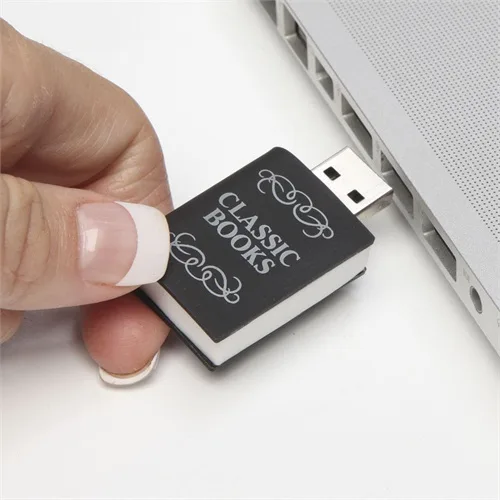
3000 classic books, all in your palm.

The library has always been the classic way to get a ton of books without spending a fortune. Then Kindle and Nook came along, occasionally offering crazy ways to get free ebooks. Now there’s a new way to save money on an entire library: A single USB. An Australian company…

BY

·

The library has always been the classic way to get a ton of books without spending a fortune. Then Kindle and Nook came along, occasionally offering crazy ways to get free ebooks. Now there’s a new way to save money on an entire library: A single USB.

An Australian company is offering a USB with 3000 classic books for your reading (and reading and reading) enjoyment. Yes, 3000. That’s a whole lot of Bronte, Dickens and Austen.

[please note this is an Internet Archive link]

On the plus side, it’s just $29.95 and everything is preloaded on that adorable drive.

On the downside, I haven’t the slightest idea what the books look like when you upload them, how easy they might be to convert to something readable on an iPhone or tablet, and I’m not even going to touch copyright issues. Still, I’m fascinated to learn more when it comes out in August. –Liz

Get the USB with 3000 classic books online coming soon, from Innovations.com


4 responses to “3000 classic books, all in your palm.”

  1. I doubt there’d be any copyright issues, since the books will probably be titles that are considered public domain.

  2. I’m fairly certain there are no copyright issues. Most, if not all, the books considered “classic” their copyright has run out making them public domain. Go to https://www.gutenberg.org/ they have tons of free ebooks available. As for converting the books that come on the drive I’d suggest Calibre

  3. if they’re in pdf format then most e readers will display them for reading. i know i’ve shared pdfs of books in the public domain with friends who have kindles and they are able to read them just as easily as i am on my nook. i seriously might have to invest in one of those.

  4. You can always use calibre to open them then convert them to any format and push to your devices. Its an awesome piece of book management/ereader software.

Leave a Reply

Your email address will not be published. Required fields are marked *

Shop Related Gift Guides

Expertly tested, editor-approved picks.

View All (opens in new tab)
Wooden toys flatlay

Heirloom Wooden Toys

Shop Guide (opens in new tab)
Skincare products flatlay

The Self-Care Edit

Shop Guide (opens in new tab)
Mom and child reading

The New Mama Edit

Shop Guide (opens in new tab)

Sophistication in your inbox.

Weekly curated gift finds

Mom-tested favorites

Holiday exclusives

No spam. Ever.