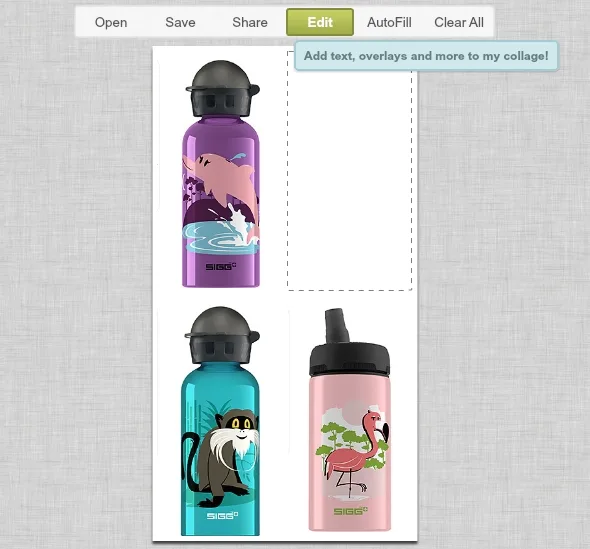
I am now one of PicMonkey‘s biggest fans along with the rest of the Cool Mom Picks crew. It’s easy to make collages. It’s easy to edit photos. But one thing that’s always been challenging is doing both together. Argh.
Well no more!
Just last night, the site added an awesome new feature which allows you to edit a PicMonkey collage as you would a regular photo. See that big green box up there? It makes a huge difference in saving you time.
I’ll give you an example using the very cute new Sigg-Cuipo Water Bottles we just featured on Cool Mom Picks.
First, I went to “create a collage,” uploaded my photos, and made…a collage.
Now, I can edit photos right in the collage–which I love! Just click on the photo and a little “edit” button pops up. You then have the option to play with the photo size or orientation, or even add a few of the basic filters or effects to the picture.
Here’s how our little blue guy looks with the Orton filter over him:
But eh, I deleted it because I like him the way he is. So then I click on “edit” up top and this box pops up:
Heed the warning, my friend, because there’s no going back now! (Hint: You can always save multiple versions of your collage, then upload them individual photos and edit the old-fashioned way. But this is way easier.)
Now that you’re in the photo editor, you can add text, color, play with textures, add dingbats or illustrations…basically anything you’d do to any other photo. All those grey icons in the left guide you through it. Me, I’m just adding a caption.
I make it (somewhat) pretty and then…I save. The end.
The basic service is free, but if you are a blogger or Pinner or digital scrapbooker or do any kind of photo editing at all, I swear up and down by the PicMonkey Royale upgrade. It’s $4.99/month or $33 for the year and you get an ad-free experience with 40% more effects, double the touch-up tools, lots of fonts and extra collage layouts.
Compare that price with Photoshop if you’re not doing serious graphics. Or really…don’t. –Liz


Leave a Reply