How to use the iOS 8 audio message feature: It's like it was made for parents.
Hold the phone! No, seriously. Hold the iPhone, because there's something new(ish) and neat and cool happening with its Message app that you'll definitely want to hear about if you haven't yet. While this fun feature has been around sinc…
May 3, 2015•2 min read
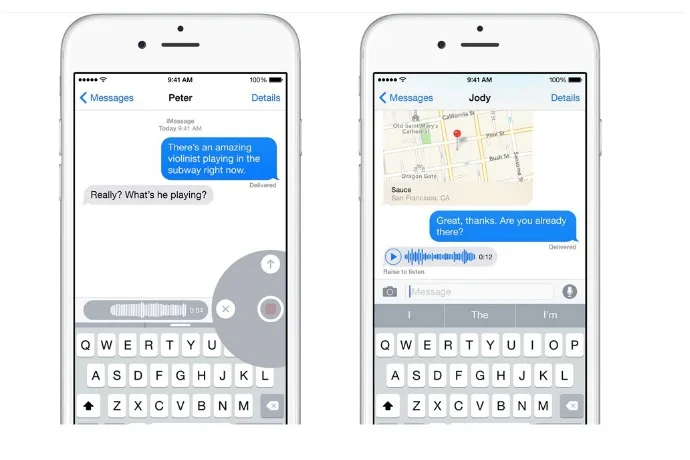
Hold the phone! No, seriously. Hold the iPhone, because there's something new(ish) and neat and cool happening with its Message app that you'll definitely want to hear about if you haven't yet. While this fun feature has been around since September, when iOS 8 launched, I'm guessing this will come as news to some of you on-the-go parents, too.
The deal is, you can send short audio messages -- your voice, a song clip, the baby giggling uncontrollably -- with a simple touch, hold and swipe.
It's almost like turning your phone into a walkie talkie, without taking the time to dial, waiting for voicemail to pick up, then leaving a message after the beep.
Imagine how lovely it is to get one of those from the kids when you're on a business trip, or to send a group chorus of happy birthday to the grandparents without having to go through the effort of checking voicemail.
Here's how to do it:
- Launch the Messages app
- Tap the new message icon (top right)
- Tap on the + button to add a contact (other iPhone users only)
- SEND button automatically changes to a microphone icon
- Touch and hold on the microphone button to record your audio message
- Swipe up to the arrow or tap it to send
Note: This is imported sample content. Original source.