Looking for the best online coupon codes? Why not have someone do it for you?
It took me a while, but I finally learned the number one rule of online shopping: never hit "buy" without first searching for a discount code. There are a lot of great coupon sites online , but now there's a simple add-on for Chrome [upd…
December 12, 2012•3 min read
It took me a while, but I finally learned the number one rule of online shopping: never hit "buy" without first searching for a discount code. There are a lot of great coupon sites online, but now there's a simple add-on for Chrome [updated: and now Firefox] that saves you the step in searching them all.
The Honey Chrome or Firefox Extension (their site will automatically detect your browser for the correct download) has been picking up steam since its launch just a few weeks ago so I thought it was worth a try. Uploading it is a cinch (you don't even have to reboot your browser) but then I was like uh...where is it? That's because it only appears as a golden button, right by the "discount code" box, when you shop some major retailers.
Here, let me walk you through it:
1. First I spotted this very cute men's scarf at Banana Republic. Originally $49.50, now $34.50. Add the $7 shipping and it's $41.50.
2. I add it to my cart
3. When I go to check out, I see the yellow "Find Savings" Honey button which is always right near the Promo Code box. (You do have to train yourself to look for it because sometimes it blends right in.)
4. Click the Honey button, and it automatically starts plugging in various codes for you, as you can see in a pop-up window.
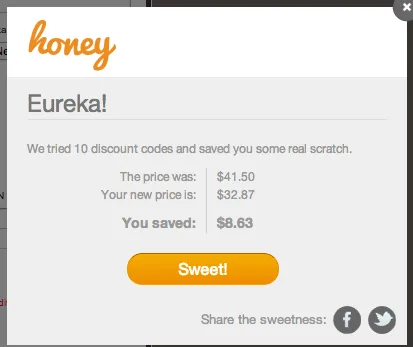
5. Aha! A valid 25% off code pre-ship saves me another $8.63 — like free shipping and then some.
6. My cart is automatically updated…done! That $57 scarf (with shipping) is now officially $32.87. And it took about 15 seconds.
Now I do wonder how I’m getting the best of those ten codes; but presumably it’s scanning codes in order of discount amount. Either way, I’ve tried it on a few sites and so far so good! Although once in a while this happens…
But hey, at least you tried.
Right now Honey works for plenty of the bigger sites, like Target, Sephora, Macy’s, Amazon, CVS, and GAP companies like Piperlime. I’d love to see more department stores like Saks or Bloomingdale’s, when those codes can lead to pretty significant savings. But more site seem to be added daily, including Think Geek (yay!) and even Hotels.com.
Can a sister put in a Jet Blue request?
If you’re wondering about other similar extensions, I do still rely heavily on Priceblink (now available for all browsers) which scours the web for the best price online before you actually spend time adding anything to your cart.
That said, I think they work great in tandem–find the best price and then double check to see if there isn’t a valid promo code that can save you a little more. And this time of year, that little more can be a lot more. Thanks, Honey! -Liz
Download the free Honey Chrome or Firefox Extension from JoinHoney.com for automatic coupon searching. It’s coming soon to other browsers.
Note: This is imported sample content. Original source.