Samsung Milk Music app keeps it fresh and free (and presumably organic) in the online music space
Remember when we told you that there would be more to come on the Samsung Milk Music app ? Well, this is the more, and it's pretty darn good. Milk Music essentially combines all the good things about online music streaming services into …
July 21, 2014•3 min read
Remember when we told you that there would be more to come on the Samsung Milk Music app? Well, this is the more, and it's pretty darn good. Milk Music essentially combines all the good things about online music streaming services into one nifty package. It's your own curated radio station playing all the tunes you enjoy most without a single, pesky ad and it's totally free of charge -- but only if you're Samsung owner, living in the U.S.
It's weird, right? To be saying: Sorry Apple users, this one ain't for you. But it's true; iOS music aficionados are definitely missing out on this cool, free internet radio situation. And it's pretty big deal.
All of Milk Music's 200-plus genre stations and library of over 13 million songs are powered by Slacker, the wildly popular and extensive music service. The Milk Music app has already hit 1 million downloads and it only launched four months ago.
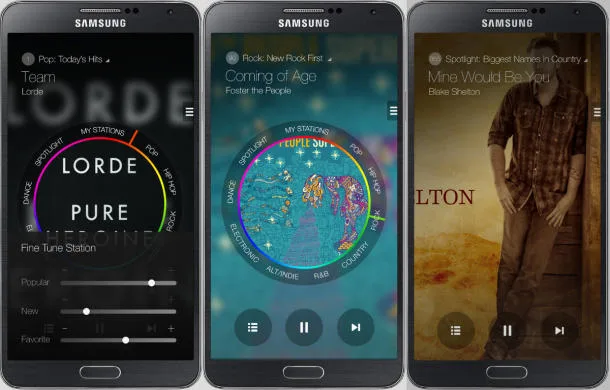
In addition to the freeness of it all, the app is super easy to use. I really like the clean design of the interface. With a quick tap on the drop-down menu, you can create a station by entering a name of an artist or song. Then there's a cool Tuning Dial that you can customize by added the nine genres you'd like to appear -- everything from Alt/Indie and Chill to R&B and World music.
With the radio dial, you can slide between those selected genres, the stations you've created, and something called "Spotlight," which is exactly what it sounds like: the spot where you'll be introduced to new music, what's trending, and first-listens. It's this Spotlight section that, according to the Samsung press release, you'll be able to hear curated songs and albums hand-picked by music industry tastemakers.
I found myself rolling through the circular dial like a kid in Mommy's desk chair. It's neat. I also like that you can manage and update your stations at any point. So if that draggy song you despise pops up on your Sia station, you can 86 it by tapping "Never Play Song" in sub menu. (It always make me chuckle how finite and serious the language can be on these thing: Never play that song ever again in my life.) But know that you only get a maximum of six skips per station on the dial, and hitting "Never Play" counts towards that total.
Oh, and if you're wondering why the name Milk, as Samsung puts it: it's fresh and organic. Riiiight. Well, this app get a thumbs-up from me, and I'll even let the naming thing slide.
Milk Music streaming app is for free download on Google Play for Samsung-only devices.
Note: This is imported sample content. Original source.