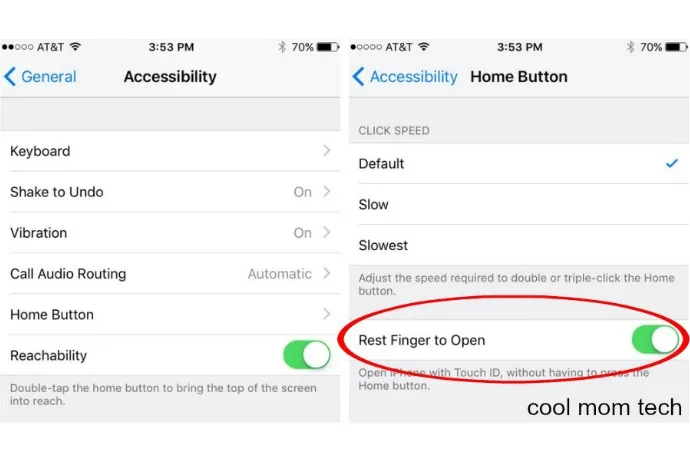
How to disable press home to unlock on the iPhone. Because it’s driving us nuts, too.

Ever since downloading iOS 10, I have swiped-to-unlock my phone about 75 times. Talk about being a creature of habit. It has taken a bit to get used to “press home to unlock,” especially because now I seem to hold the home button too long and end up activating Siri with Touch…

BY

·

Here's how to disable press home to unlock on the iPhone | Cool Mom Tech

Ever since downloading iOS 10, I have swiped-to-unlock my phone about 75 times. Talk about being a creature of habit. It has taken a bit to get used to “press home to unlock,” especially because now I seem to hold the home button too long and end up activating Siri with Touch ID at the same time. Argh!

Luckily, there’s a quick and easy way to bypass that extra press of the home button with a simple setting switch. If you’d prefer to just rest your finger on the home button to unlock your phone, go to Settings > General > Accessibility > Home Button. Then switch the toggle to activate “rest finger to open.”

Related: A simple trick that could save you a ton of battery life

No more pushing, then pushing again, then hearing Siri ask how she can help you. Until perhaps the next big iOS update when they decide to switch things up again.


13 responses to “How to disable press home to unlock on the iPhone. Because it’s driving us nuts, too.”

  1. Thaaaank you! I almost flip from time to time this new unlocking thing is totally frustrating and unintuitive. Especially as it worked just fine before.

  2. THANK YOU! ALL CAPS NECESSARY!

  3. My iPhone 5 with 10.0.2 doesn’t have that option 🙁

  4. this is so helpful. I can usually roll with the changes on the upgrades, but this one has been hard! That swipe is so ingrained….I wonder why they didn’t keep an option to change it back….. We must all assimilate I guess.

  5. THANK YOU!! You guys are such an amazing resource for all such critical issues. Now if only you could help my thumb print work better through my Lifeproof case!

  6. I do not have the “Rest Finger to Open” option. Does something else need to be done before I go back in to the Accessibility area?

  7. I don’t believe IPhone 5 has that option……….I tried this but there is no on off switch for the “rest finger to open” option you mention

  8. Dam this did not work for me.. Still home to press the dam home button and yea Siri still comes up and ask me shit.. Frustrating these fucking upgrades

  9. Now if I can get my email string display to be the way it was before! Hate that now it shows emails in the string from all folders including sent and trash

  10. I don’t have the option that says “rest finger to open”.

  11. What if the “rest finger to open” option NOT there??

  12. Amy Lingenfelter

    How do you do the same unlock on an Apple iPad?

  13. I wish they would have given us the option to choose if we wanted swipe the screen as an option. The new update, I think is a ploy to wear out our home button faster, so we would have to replace our device sooner. Very unhappy with this iOS update.

Leave a Reply

Your email address will not be published. Required fields are marked *

Shop Related Gift Guides

Expertly tested, editor-approved picks.

View All (opens in new tab)
Wooden toys flatlay

Heirloom Wooden Toys

Shop Guide (opens in new tab)
Skincare products flatlay

The Self-Care Edit

Shop Guide (opens in new tab)
Mom and child reading

The New Mama Edit

Shop Guide (opens in new tab)

Sophistication in your inbox.

Weekly curated gift finds

Mom-tested favorites

Holiday exclusives

No spam. Ever.