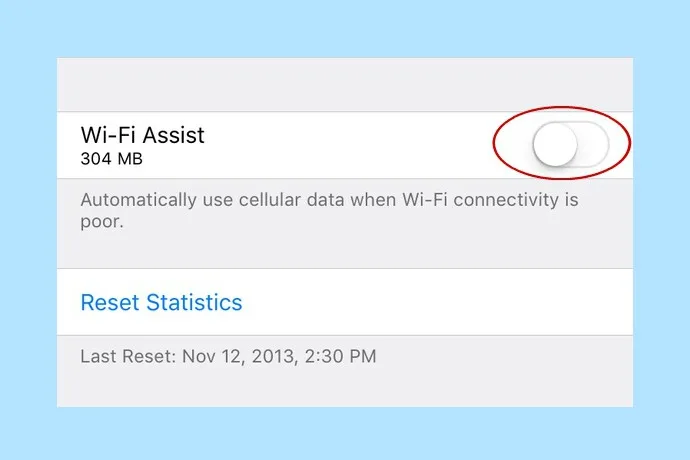
A simple trick that could save you a ton of battery life

If you’re having issues with your iPhone on iOS 10, here’s a simple trick that could save you a whole lot of battery life. Bonus: It’ll help with data usage too. Although Wi-Fi Assist is meant to be a helpful service by automatically switching your phone over to cellular data when it…

BY

·

How to turn off Wi-Fi Assist and save yourself battery life and data

If you’re having issues with your iPhone on iOS 10, here’s a simple trick that could save you a whole lot of battery life. Bonus: It’ll help with data usage too.

Although Wi-Fi Assist is meant to be a helpful service by automatically switching your phone over to cellular data when it detects an unstable Wi-Fi network, it can a battery killer and a data eater.


Related: How to fix iPhone battery issues in 6 easy steps 

Luckily, it’s very easy to remedy. Go to Settings > Cellular and scroll all the way down to the Wi-Fi Assist feature. Simply toggle off and you’re done. Now, your phone won’t automatically make the switch anymore, which can really help save your battery, and your data.

Our suggestion: Make sure it’s off on your kids’ phones, too, especially if you don’t have an unlimited data plan.


One response to “A simple trick that could save you a ton of battery life”

  1. This is random. But why is it a battery killer?

Leave a Reply

Your email address will not be published. Required fields are marked *

Shop Related Gift Guides

Expertly tested, editor-approved picks.

View All (opens in new tab)
Wooden toys flatlay

Heirloom Wooden Toys

Shop Guide (opens in new tab)
Skincare products flatlay

The Self-Care Edit

Shop Guide (opens in new tab)
Mom and child reading

The New Mama Edit

Shop Guide (opens in new tab)

Sophistication in your inbox.

Weekly curated gift finds

Mom-tested favorites

Holiday exclusives

No spam. Ever.