iPhone trick: How to mute text threads (but still get notifications for your other texts)

Lately I discovered how to mute text threads on my iPhone, and let me tell you, it’s been a productivity game changer. Because as much as I love a raucous group chat once in a while, I don’t accomplish much when I have notifications popping up on my phone and…

BY

·

iPhone trick: How to mute text threads (but still get notifications for your other texts)

Lately I discovered how to mute text threads on my iPhone, and let me tell you, it’s been a productivity game changer. Because as much as I love a raucous group chat once in a while, I don’t accomplish much when I have notifications popping up on my phone and computer literally every two seconds.

So! Here’s how to mute the text threads you want–looking at you automated messages–and still get notified of your other important texts.

Related: How to lock your notes in the Notes app

1. Open Messages

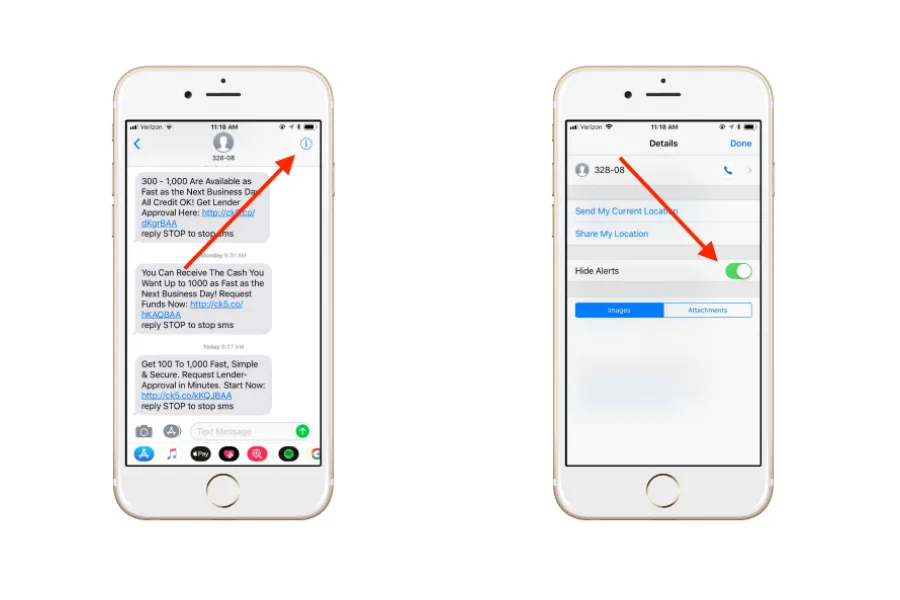
2. Open the text thread you want to mute

How to mute a text thread | Cool Mom Tech

3. Click the information icon, a lower case letter i with a circle around it, in the top right corner

iPhone trick: how to mute text threads--but still get notifications for your other texts

4 Tap “Hide Alerts.”

5. Done! If you’ve done it correctly, you should see a moon icon by the muted thread when you open Messages. When you get new texts on this thread, you’ll still see a blue dot by the conversation, but you won’t receive notifications. Because you’re not the boss of me, carpooling group text!


Leave a Reply

Your email address will not be published. Required fields are marked *

Shop Related Gift Guides

Expertly tested, editor-approved picks.

View All (opens in new tab)
Wooden toys flatlay

Heirloom Wooden Toys

Shop Guide (opens in new tab)
Skincare products flatlay

The Self-Care Edit

Shop Guide (opens in new tab)
Mom and child reading

The New Mama Edit

Shop Guide (opens in new tab)

Sophistication in your inbox.

Weekly curated gift finds

Mom-tested favorites

Holiday exclusives

No spam. Ever.