If you’ve upgraded to iOS 11, then there’s a good chance you’ve stumbled upon the new Control Center. Well, given it takes up almost the whole screen now, it’s pretty hard to miss. And if you haven’t, we’ll I think you’re in for a treat. Because you can now customize your Control Center, making it more useful than it ever was before.
Related: 8 smart ways to use your Control Center to make your life a whole lot easier
How to find Control Center on your iPhone
If you’ve never used Control Center before, all you need to do is swipe up from any screen. See how easy that was? Take a peek at our past Control Center post to see what each button actually does (if you need a little primer). As you can probably guess, having quick access to the iPhone features you use most is pretty handy.
How to customize the Control Center on your iPhone
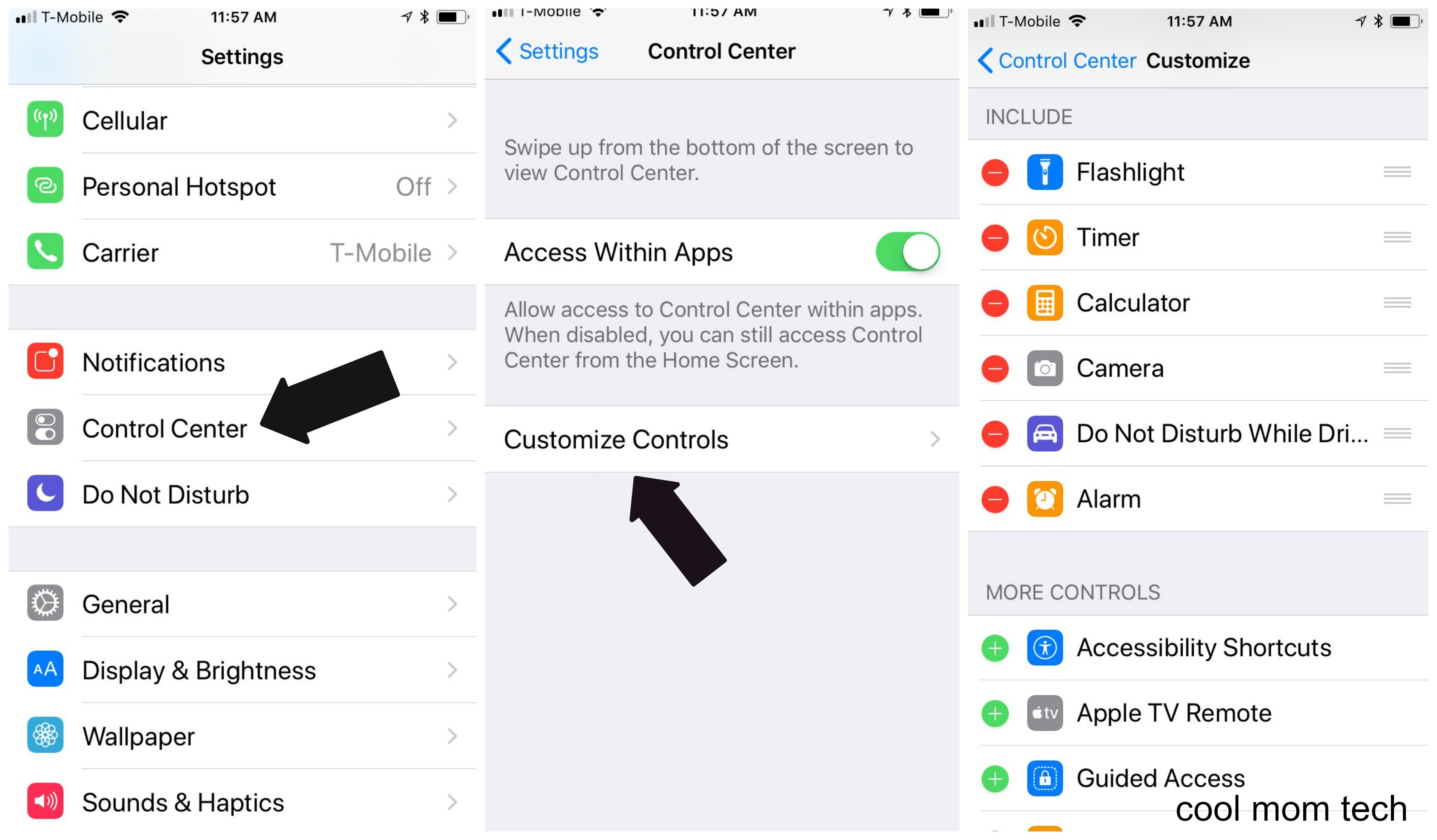
Adding the specific features to your custom Control Center is easy. Head to Settings > Control Center > Customize Controls. Then decide which apps and features you want to keep, and which you really don’t need to be able to access quickly.
Related: Everything you need to know about the iPhone 8 and iPhone X
And that’s it! No more searching around for your smart phone camera to grab that quick shot of your kids, or flipping through your settings to find Do Not Disturb While Driving.
Want to see how to do this in person? Check out our handy iOS 11 video.
Top Photo by Saulo Mohana on Unsplash


Leave a Reply