Scribble Creative Book Maker app: Let kids become instant authors and illustrators
I'm pretty measured about letting my kids use my iPad, especially when they could be playing outside, practicing their instruments or learning their fifth language. Ha. In truth, I'm all about balance in our household, and I'm definitely…
By Jeana Tahnk
December 1, 2015•3 min read
I'm pretty measured about letting my kids use my iPad, especially when they could be playing outside, practicing their instruments or learning their fifth language. Ha. In truth, I'm all about balance in our household, and I'm definitely a fan of apps that let kids explore their creativity, like Mini Monet for art or Makesto for storytelling. And now I'm happy to discover Scribble Creative Book Maker for Kids from the makers of the uber popular Scribble Press app, which combine elements of both.
Related: 5 of the best storytelling apps for kids. Only the kids do the storytelling.
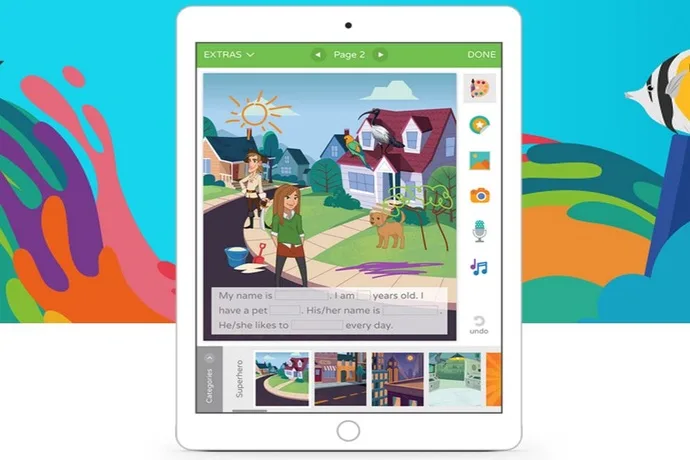
The Scribble Creative Book Maker app (iOS and Android) is a fun way to let kids become authors and illustrators of their own 5 to 10 page storybooks. It comes with about 30 storybook templates and book outlines that kids fill in themselves, Mad Libs style, with categories like About Me, Fairy Tales, Imagination and Animal. What I like is that it provides younger kids with enough text to frame the story, but also gives them the freedom to add their own creativity. Older kids however will probably prefer the blank book option which gives them free reign to write and draw whatever they want, and definitely offering more freedom than the outlined storybooks. What's nice about both kinds of stories is that kids can completely personalize, digitally draw and color on each page and add visual interest with included stickers, backgrounds and images. I will admit I'm not crazy about the preset illustrations that are offered -- let's just say they won't be up for any Caldecott awards any day soon -- so it's nice that kids can change them up. Even if they're just digitally drawing stick figures. Another cool feature: kids can record themselves reading a certain page and insert custom narration and music. They can also take photos through the app or even add their faces to the characters in the story, to completely personalize it. Like kids won't go nuts for that The suggested age for this app is 6-8 and I'd say that's about right; it's definitely helpful to know how to read, and also to have the dexterity to draw and navigate around the app. As for the $4.99 price tag, I usually shy away from apps that cost more than a dollar or two. But to my surprise, I find there are enough features and customization options to make it worth the purchase. Besides, it will pay for itself when your kids are on the New York Times bestseller list in 20 years. Scribble - Creative Book Maker for Kids is available for iOS and Google Play for $4.99. There is a free lite version of the app (Android, too), if you want to take a preliminary look, that comes with three storybooks and limited features.Note: This is imported sample content. Original source.