The best list-making apps? Reader Q+A
I used to use my Netflix queue to keep the list of movies I'd missed, shows I wanted to watch on DVD, etc., but now I'm not sure where to manage this stuff since we canceled our subscription. Is there a way for me to organize my lists fo…
By Jeana Tahnk
January 26, 2012•2 min read
I used to use my Netflix queue to keep the list of movies I'd missed, shows I wanted to watch on DVD, etc., but now I'm not sure where to manage this stuff since we canceled our subscription. Is there a way for me to organize my lists for easy access? -Aleca
Ahh, a list-making woman after my own heart! Aleca, there are so many great list-making apps out there that will help you not only organize your TV and movie picks, but your grocery lists, calendar items, to dos, and so much more.
Here are a few options to get you started--beyond Google Docs, all selected for their ease of use and ability to sync across platforms and devices, so your lists are always on hand.
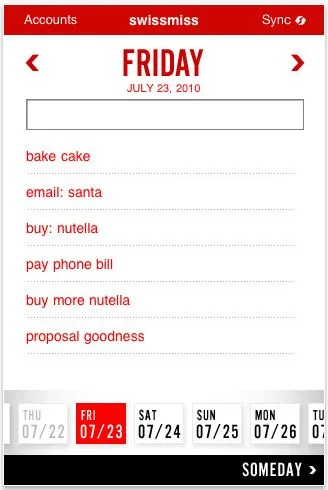
Teux Deux (above) by the fabulous design crew at Swiss Miss is a super simple, very intuitive web-based app with a mobile phone app that syncs syncs to keep all your lists readily at home, at work, or wherever you are. Simply input your items that need to be completed on any given day and cross them off as you complete them, or they automatically carry over to the next day. There's something majorly satisfying about that cross-off feature, trust me. (iTunes, $2.99)
Evernote is a hugely popular list-making app that also lets you sync your content across multiple devices and platforms. Our own readers have some amazing tips on how to use Evernote. Going beyond just lists, it lets you attach photos, create to-do lists, even record voice reminders so that you don't forget to get that birthday present for Saturday's party. (iTunes or for Android on Google Play, free)
Wanderlust is another free, cross-platform app. Using your Wunderlist account, you can instantly share notes and lists with friends, email lists to yourself or others, assign deadlines to your tasks (must get mani/pedi by this Friday!) and assign filters to different tasks so you can figure out which take priority at a glance. (iTunes or Google Play for Android, free)
Paperless has an easy interface with tons of functionality--you can email lists, copy and paste lists, search for items on all your lists, even put passcode locks on lists you don't want people to see. (Could be good for gift shopping. Could also be good for that movie queue...) The lite version is free, but only lets you input 30 items. If you need more space, go with the premium version. (iTunes, free for lite / $2.99 for premium) -Jeana
Any list-keeping apps you love that we missed?
Filed Under:Android appsapps for parentsiOS appslifestyle appslistsOrganizationorganizersproductivity
Note: This is imported sample content. Original source.